点Star赠送官方Vue2/3使用Demo一份
TIANAI-CAPTCHA
可能是开源界最好用的行为验证码工具
介绍
简介
TIANAI-CAPTCHA,以下简称TAC 是一个开源的行为验证码工具,支持多种验证码类型,分别有java、go等语言的实现。
开源版默认提供了 滑块验证码、旋转验证码、文字点选验证码、滑动还原验证码、工作量证明验证码等,
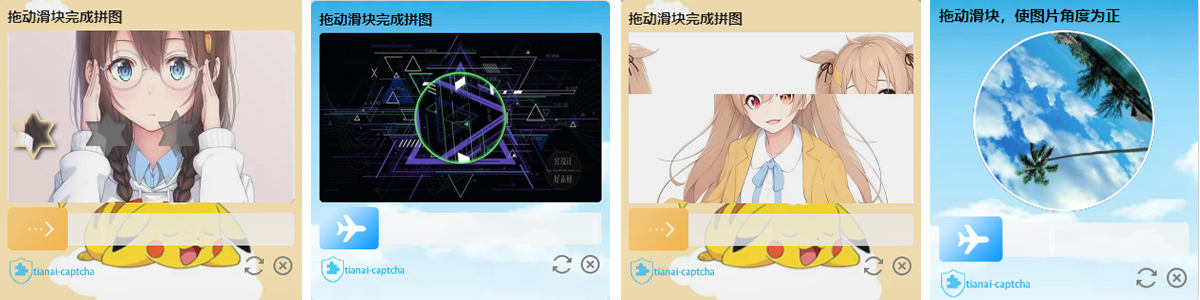

在线体验
文档
当前文档版本: v1.5.6
阅读指引
建议按顺序阅读:
- 快速上手:先跑通 SpringBoot + 前端 SDK 最小链路
- 后端 / 前端配置:按业务补齐 YAML、资源、样式
- 二次验证、生成参数、POW:按需接入
- 进阶扩展:缓存、拦截器、图片转换等
完整可运行示例:tianai-captcha-demo
源码仓库:tianai-captcha
English docs: English
快速上手
验证码类型一览
| 类型常量 | 说明 | 是否需要背景图 | 是否需要模板图 |
|---|---|---|---|
SLIDER | 滑块拼图 | 是 | 是(缺口) |
ROTATE | 旋转验证 | 是 | 是(轮廓) |
CONCAT | 滑动还原 | 是 | 否 |
WORD_IMAGE_CLICK | 文字点选 | 是 | 否(可配字体) |
POW | 工作量证明(1.5.6 新增) | 否 | 否 |
类型常量见:CaptchaTypeConstant。
SpringBoot 最小接入
1. 引入依赖
<dependency>
    <groupId>cloud.tianai.captcha</groupId>
    <artifactId>tianai-captcha-springboot-starter</artifactId>
    <version>1.5.6</version>
</dependency>
2. 最小配置(application.yaml)
captcha:
  # 加载系统自带滑块/旋转等模板(缺口图)
  init-default-resource: true
  expire:
    default: 10000
    WORD_IMAGE_CLICK: 60000
更多配置项见下文 后端配置详解。
3. 配置背景图(推荐)
使用系统模板时,背景图尺寸建议 600x360。POW 不需要配置背景图。
@Configuration
public class CaptchaResourceConfiguration {

    @Bean
    public ResourceStore resourceStore() {
        LocalMemoryResourceStore resourceStore = new LocalMemoryResourceStore();
        // Resource 参数: 资源类型(classpath / file / URL)、路径、tag
        resourceStore.addResource(CaptchaTypeConstant.SLIDER,
                new Resource("classpath", "bgimages/a.jpg", "default"));
        resourceStore.addResource(CaptchaTypeConstant.ROTATE,
                new Resource("classpath", "bgimages/48.jpg", "default"));
        resourceStore.addResource(CaptchaTypeConstant.CONCAT,
                new Resource("classpath", "bgimages/48.jpg", "default"));
        resourceStore.addResource(CaptchaTypeConstant.WORD_IMAGE_CLICK,
                new Resource("classpath", "bgimages/c.jpg", "default"));
        return resourceStore;
    }
}
4. 生成 / 校验接口
与官方 demo 一致:
@RestController
public class CaptchaController {

    @Autowired
    private ImageCaptchaApplication imageCaptchaApplication;

    @RequestMapping("/gen")
    public ApiResponse<ImageCaptchaVO> genCaptcha(
            @RequestParam(value = "type", required = false) String type) {
        if (StringUtils.isBlank(type)) {
            type = CaptchaTypeConstant.SLIDER;
        }
        GenerateParam param = new GenerateParam();
        param.setType(type);
        return imageCaptchaApplication.generateCaptcha(param);
    }

    @PostMapping("/check")
    public ApiResponse<?> checkCaptcha(@RequestBody CaptchaData data) {
        ApiResponse<?> response = imageCaptchaApplication.matching(data.getId(), data.getData());
        if (response.isSuccess()) {
            // 成功后把 id 回给前端,可用于二次验证 / 业务绑定
            return ApiResponse.ofSuccess(Collections.singletonMap("id", data.getId()));
        }
        return response;
    }

    @lombok.Data
    public static class CaptchaData {
        private String id;
        private ImageCaptchaTrack data;
    }
}
- 生成:
GET /gen?type=SLIDER(也可用ROTATE/CONCAT/WORD_IMAGE_CLICK/POW) - 校验:
POST /check,Body:{ "id": "...", "data": { ...轨迹或POW结果... } }
提示:新版本推荐
matching(id, new MatchParam(track));若开启了二次验证,starter 包装类主要挂钩在matching(String, ImageCaptchaTrack)上,与 demo 保持一致更稳妥。
前端最小接入
1. 获取 SDK
- 下载打包文件:https://gitee.com/dromara/tianai-captcha/releases/download/tianai-captcha-1.5.6/tac-web.zip
- 或自行编译:https://gitee.com/dromara/tianai-captcha/tree/master/tianai-captcha-web-sdk (
npm run build)
请保证 前端 SDK 与后端版本一致。将解压后的 tac 目录放到可被浏览器访问的位置(如 SpringBoot 的 static/tac)。
2. 最小示例(直接引入,更容易上手)
<link rel="stylesheet" href="/tac/css/tac.css">
<script src="/tac/js/tac.min.js"></script>
<div id="captcha-box"></div>
<script>
  new TAC({
    requestCaptchaDataUrl: "/gen?type=SLIDER",
    validCaptchaUrl: "/check",
    bindEl: "#captcha-box",
    validSuccess: (res, c, tac) => {
      tac.destroyWindow();
      console.log("captcha id =", res.data.id);
    }
  }, {}).init();
</script>
生产环境更推荐用 load.js 按需加载(首屏更轻),完整配置、样式、类型切换见 前端配置详解。
后端配置详解
配置类:cloud.tianai.captcha.spring.autoconfiguration.SpringImageCaptchaProperties(prefix = captcha)。
YAML 全量说明
captcha:
  # 缓存 key 前缀,默认 captcha
  prefix: captcha
  # 过期时间(毫秒)。未配 expire.default 时,代码内默认约 20 秒
  expire:
    default: 10000
    WORD_IMAGE_CLICK: 60000
    POW: 60000
  # 是否加载系统自带模板,默认 false
  init-default-resource: true
  # 内置模板路径前缀,一般不用改
  # default-resource-prefix: classpath:META-INF/cut-image/template
  # 本地预生成缓存(提高并发时的生成速度)
  local-cache-enabled: true
  local-cache-size: 20
  local-cache-wait-time: 1000
  local-cache-period: 5000
  # local-cache-expire-time: 10000
  # 点选验证码字体(可多个;支持 ?tag=xxx)
  font-path:
    - classpath:font/SimHei.ttf
    # - classpath:font/other.ttf?tag=font1
  secondary:
    enabled: false
    expire: 120000
    keyPrefix: "captcha:secondary"
说明:
- 引入 Spring Data Redis 后,脚手架会优先使用
RedisCacheStore/RedisResourceStore;否则用本地实现。 - POW 不依赖
init-default-resource与背景图配置。
自定义模板图
滑块 / 旋转除背景图外,还需模板(凹槽、轮廓)。开启 init-default-resource: true 时可直接用官方模板;自定义示例如下:
@Bean
public ResourceStore resourceStore() {
    LocalMemoryResourceStore resourceStore = new LocalMemoryResourceStore();

    ResourceMap sliderTemplate = new ResourceMap("default", 2);
    sliderTemplate.put("active.png", new Resource("classpath", "META-INF/cut-image/template/slider_1/active.png"));
    sliderTemplate.put("fixed.png", new Resource("classpath", "META-INF/cut-image/template/slider_1/fixed.png"));
    resourceStore.addTemplate(CaptchaTypeConstant.SLIDER, sliderTemplate);

    ResourceMap rotateTemplate = new ResourceMap("default", 2);
    rotateTemplate.put("active.png", new Resource("classpath", "META-INF/cut-image/template/rotate_1/active.png"));
    rotateTemplate.put("fixed.png", new Resource("classpath", "META-INF/cut-image/template/rotate_1/fixed.png"));
    resourceStore.addTemplate(CaptchaTypeConstant.ROTATE, rotateTemplate);

    resourceStore.addResource(CaptchaTypeConstant.SLIDER, new Resource("classpath", "bgimages/a.jpg", "default"));
    // 也支持 file / URL
    // resourceStore.addResource(CaptchaTypeConstant.SLIDER, new Resource("file", "/data/bg.jpg", "default"));
    // resourceStore.addResource(CaptchaTypeConstant.SLIDER, new Resource("URL", "https://xx/bg.jpg", "default"));
    return resourceStore;
}
- 模板常用键名:
active.png(活动块)、fixed.png(凹槽);可选mask.png、混淆用obfuscate_fixed.png - 文字点选、滑动还原、POW 不需要模板图
传统 Java 项目(非 SpringBoot)
<dependency>
    <groupId>cloud.tianai.captcha</groupId>
    <artifactId>tianai-captcha</artifactId>
    <version>1.5.6</version>
</dependency>
ImageCaptchaApplication application = TACBuilder.builder()
        .addDefaultTemplate()
        .expire("default", 10000L)
        .expire(CaptchaTypeConstant.WORD_IMAGE_CLICK, 60000L)
        .expire(CaptchaTypeConstant.POW, 60000L)
        .setInterceptor(EmptyCaptchaInterceptor.INSTANCE)
        .addResource(CaptchaTypeConstant.SLIDER, new Resource("classpath", "META-INF/cut-image/resource/1.jpg"))
        .addResource(CaptchaTypeConstant.WORD_IMAGE_CLICK, new Resource("classpath", "META-INF/cut-image/resource/1.jpg"))
        .addResource(CaptchaTypeConstant.ROTATE, new Resource("classpath", "META-INF/cut-image/resource/1.jpg"))
        .addResource(CaptchaTypeConstant.CONCAT, new Resource("classpath", "META-INF/cut-image/resource/1.jpg"))
        .cached(10, 1000, 5000, 10000L)
        .addFont(new Resource("file", "/path/to/font.ttf"))
        .setCacheStore(new LocalCacheStore())
        .setTransform(new Base64ImageTransform())
        .build();

ApiResponse<ImageCaptchaVO> captcha = application.generateCaptcha(CaptchaTypeConstant.SLIDER);
ApiResponse<?> match = application.matching(captchaId, track);
ImageCaptchaApplication 线程安全,建议全局单例,不要反复 build()。
前端配置详解
兼容:Chrome / Firefox / Safari / Opera / 主流手机浏览器 / iOS 与 Android WebView
框架:H5、Vue2/3、React、Angular(原生 JS SDK,不绑死框架)
上手阶段可用上文「直接引入 tac.min.js」快速跑通。
上线更推荐 load.js 按需加载:页面只引入很小的 load.js,用户点击登录时再加载 tac.min.js / tac.css,首屏更轻。window.initTAC 与 window.loadTAC 是同一方法。
| 方式 | 场景 | 入口 |
|---|---|---|
直接引入 tac.min.js | 快速上手、演示页 | new TAC(config, style).init() |
load.js 按需加载(上线推荐) | 登录/提交时再拉验证码资源 | window.loadTAC(tac目录, config, style) |
captchaConfig(行为配置)
| 配置项 | 必填 | 说明 |
|---|---|---|
bindEl | 是 | 挂载容器选择器,如 #captcha-box |
requestCaptchaDataUrl | 是 | 生成接口,如 /gen?type=SLIDER |
validCaptchaUrl | 是 | 校验接口,如 /check |
validSuccess(res, c, tac) | 推荐 | 校验成功;务必自行实现业务逻辑 |
validFail(res, c, tac) | 否 | 失败回调;默认 reloadCaptcha() |
btnRefreshFun(el, tac) | 否 | 刷新按钮;默认 reload |
btnCloseFun(el, tac) | 否 | 关闭按钮;默认 destroyWindow() |
requestHeaders | 否 | 自定义请求头(鉴权等) |
常用实例方法:init() / reloadCaptcha() / destroyWindow() / destroyCaptcha()
styleConfig(样式与文案)
| 配置项 | 说明 |
|---|---|
logoUrl | Logo 地址;null 隐藏 logo;不传则用默认 |
btnUrl | 滑块按钮图(默认内置) |
bgUrl | 验证码窗口背景图 |
moveTrackMaskBgColor | 滑动轨道填充色,默认 #89d2ff |
moveTrackMaskBorderColor | 滑动轨道边框色,默认 #0298f8 |
i18n | 文案与字号,可只覆盖需要改的项 |
i18n 键(1.5.6)
| 键 | 默认用途 |
|---|---|
tips_success | 成功提示 |
tips_error | 失败提示 |
slider_title / slider_title_size | 滑块 |
rotate_title / rotate_title_size | 旋转 |
concat_title / concat_title_size | 滑动还原 |
image_click_title / image_click_title_size | 点选 |
pow_title / pow_title_size | 工作量证明(默认「正在验证中:」) |
作者提供的一组可参考样式(按钮 / 背景 / logo):
const style = {
  btnUrl: "https://minio.tianai.cloud/public/captcha-btn/btn3.png",
  bgUrl: "https://minio.tianai.cloud/public/captcha-btn/btn3-bg.jpg",
  logoUrl: "https://minio.tianai.cloud/public/static/captcha/images/logo.png",
  moveTrackMaskBgColor: "#f7b645",
  moveTrackMaskBorderColor: "#ef9c0d"
};
Demo 一:load.js 按需加载(推荐)
适合登录页:先只加载 load.js,点击按钮后再加载验证码资源并弹出。
准备:
- SDK:
tac-web.zip解压到可访问路径,如/tac(内含js/tac.min.js、css/tac.css) - load.js 放到
/js/load.js
<!DOCTYPE html>
<html lang="zh-CN">
<head>
  <meta charset="UTF-8">
  <meta name="viewport" content="width=device-width, initial-scale=1.0">
  <title>TAC load.js Demo</title>
  <!-- 只引入 load.js;tac 的 js/css 在点击时自动加载 -->
  <script src="/js/load.js"></script>
  <style>
    .top { overflow: auto; margin-bottom: 12px; }
    .top li {
      float: left; list-style: none; width: 120px; height: 40px;
      margin-right: 5px; line-height: 40px; text-align: center;
      background: #409eff; color: #fff; cursor: pointer;
    }
    #login-btn {
      width: 160px; height: 44px; border: none; border-radius: 6px;
      background: #4BC065; color: #fff; cursor: pointer;
    }
  </style>
</head>
<body>
<ul class="top">
  <li data-type="SLIDER">滑块</li>
  <li data-type="ROTATE">旋转</li>
  <li data-type="CONCAT">滑动还原</li>
  <li data-type="WORD_IMAGE_CLICK">点选</li>
  <li data-type="POW">工作量证明</li>
</ul>
<button id="login-btn">登录(拉起验证码)</button>
<div id="captcha-box"></div>

<script>
  let globalTAC = null;
  let currentType = "SLIDER";

  // ---------- 行为配置 ----------
  const captchaConfig = {
    requestCaptchaDataUrl: "/gen?type=SLIDER",
    validCaptchaUrl: "/check",
    bindEl: "#captcha-box",
    // requestHeaders: { Authorization: "Bearer xxx" },
    validSuccess: (res, c, tac) => {
      tac.destroyWindow();
      // 与后端 /check 成功返回一致,业务侧拿 id
      login(res.data.id);
    },
    validFail: (res, c, tac) => {
      console.log("校验失败", res);
      tac.reloadCaptcha();
    },
    btnRefreshFun: (el, tac) => tac.reloadCaptcha(),
    btnCloseFun: (el, tac) => tac.destroyWindow()
  };

  // ---------- 样式 / 文案(均可选) ----------
  const style = {
    logoUrl: null, // 隐藏 logo;也可换成自定义地址
    // btnUrl: "https://minio.tianai.cloud/public/captcha-btn/btn3.png",
    // bgUrl: "https://minio.tianai.cloud/public/captcha-btn/btn3-bg.jpg",
    moveTrackMaskBgColor: "#89d2ff",
    moveTrackMaskBorderColor: "#0298f8",
    i18n: {
      tips_success: "验证成功,耗时%s秒",
      tips_error: "验证失败,请重新尝试!",
      slider_title: "拖动滑块完成拼图",
      slider_title_size: "15px",
      rotate_title: "拖动滑块完成拼图",
      rotate_title_size: "15px",
      concat_title: "拖动滑块完成拼图",
      concat_title_size: "15px",
      image_click_title: "请依次点击:",
      image_click_title_size: "20px",
      pow_title: "正在验证中:",
      pow_title_size: "15px"
    }
  };

  // tac 静态资源目录前缀(该目录下需有 js/tac.min.js、css/tac.css)
  // 跨域时写完整地址,如 "http://localhost:8080/tac"
  const TAC_DIR = "/tac";

  function login(captchaId) {
    // 二次验证示例(需后端 captcha.secondary.enabled=true)
    fetch("/check2?id=" + encodeURIComponent(captchaId))
      .then(r => r.json())
      .then(ok => alert(ok ? "登录成功" : "二次验证失败"))
      .catch(err => console.error(err));
  }

  function openCaptcha(type) {
    currentType = type || currentType;
    captchaConfig.requestCaptchaDataUrl = "/gen?type=" + currentType;
    if (globalTAC) {
      globalTAC.destroyWindow();
      globalTAC = null;
    }
    // 参数1:tac 目录;参数2:行为配置;参数3:样式配置
    // 已加载过时 load.js 会复用脚本,不会重复下载
    window.loadTAC(TAC_DIR, captchaConfig, style)
      .then(tac => {
        globalTAC = tac;
        tac.init();
      })
      .catch(e => console.log("加载失败", e));
  }

  document.getElementById("login-btn").addEventListener("click", function () {
    openCaptcha(currentType);
  });

  document.querySelectorAll(".top li").forEach(li => {
    li.addEventListener("click", function () {
      openCaptcha(this.getAttribute("data-type"));
    });
  });
</script>
</body>
</html>
loadTAC 会自动请求:
{前缀}/js/tac.min.js{前缀}/css/tac.css
说明:
- 前缀请指向解压后的
tac目录(本地常见为/tac或http://localhost:8080/tac) - 加载过程中会在
bindEl里显示「请稍等...」 - 切换类型前先
destroyWindow(),再改requestCaptchaDataUrl并重新loadTAC/init RANDOM需后端/gen自行随机(官方 demo 已实现,随机池不含 POW)
Demo 二:直接引入 tac.min.js(可选)
适合演示页或已把 tac 资源常驻打包进项目的场景,写法与 tianai-captcha-demo 一致:
<!DOCTYPE html>
<html lang="zh-CN">
<head>
  <meta charset="UTF-8">
  <meta name="viewport" content="width=device-width, initial-scale=1.0">
  <title>TAC 直接引入 Demo</title>
  <link rel="stylesheet" href="/tac/css/tac.css">
  <script src="/tac/js/tac.min.js"></script>
</head>
<body>
<button id="login-btn">登录</button>
<div id="captcha-box"></div>
<script>
  const config = {
    requestCaptchaDataUrl: "/gen?type=SLIDER",
    validCaptchaUrl: "/check",
    bindEl: "#captcha-box",
    validSuccess: (res, c, tac) => {
      tac.destroyWindow();
      console.log("captcha id =", res.data.id);
    },
    validFail: (res, c, tac) => tac.reloadCaptcha()
  };
  const style = { logoUrl: null };

  document.getElementById("login-btn").onclick = function () {
    new TAC(config, style).init();
  };
</script>
</body>
</html>
二次验证(两步验证)
一次校验只证明「人机交互通过」。业务接口通常还要带上 token,再做一次校验,把验证码和登录/下单等流程绑在一起。
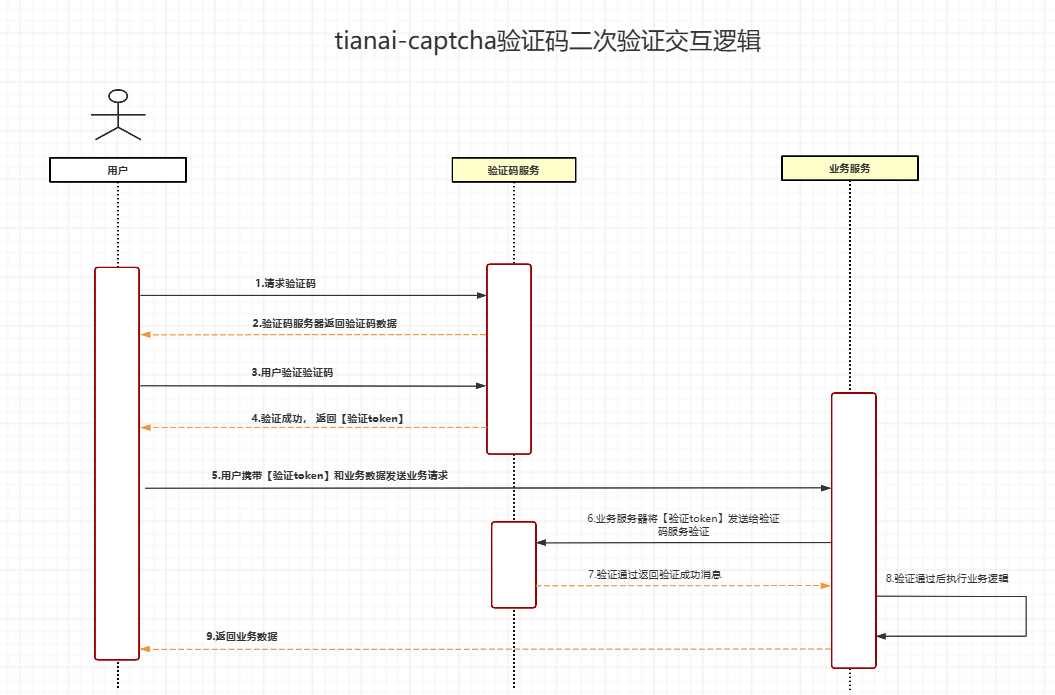
开启
目前官方脚手架内置了二次验证实现(逻辑很简单:校验成功后缓存一个带过期时间的 key)。也推荐自行实现。
captcha:
  secondary:
    enabled: true
    expire: 120000
    keyPrefix: "captcha:secondary"
业务侧校验
@GetMapping("/check2")
public boolean check2(@RequestParam("id") String id) {
    if (imageCaptchaApplication instanceof SecondaryVerificationApplication) {
        return ((SecondaryVerificationApplication) imageCaptchaApplication).secondaryVerification(id);
    }
    return false;
}
前端在 validSuccess 里拿到 res.data.id 后,调用业务接口并带上该 id(见 demo)。
生成参数进阶(GenerateParam)
生成时除了 type,还可通过 GenerateParam 精细控制。
开启混淆
GenerateParam param = new GenerateParam();
param.setType(CaptchaTypeConstant.SLIDER);
param.setObfuscate(true); // 滑块可生成干扰缺口等
application.generateCaptcha(param);
对 POW 无效。
点选:校验字数与干扰字数
GenerateParam param = new GenerateParam();
param.setType(CaptchaTypeConstant.WORD_IMAGE_CLICK);
param.setObfuscate(true);
param.addParam(ParamKeyEnum.CLICK_CHECK_CLICK_COUNT, 2);   // 需点对的字数,默认约 4
param.addParam(ParamKeyEnum.CLICK_INTERFERENCE_COUNT, 3);  // 干扰字数,默认约 2
application.generateCaptcha(param);
自定义容错值
容错用于允许用户滑动/点击相对标准答案的误差。默认约 0.02。POW 不使用容错。
param.addParam(ParamKeyEnum.TOLERANT, 0.02);
指定字体包
YAML:
captcha:
  font-path:
    - classpath:font/123.ttf?tag=font1
或代码:
resourceStore.addResource(FontCache.FONT_TYPE, new Resource("classpath", "font/123.ttf", "font1"));
// 生成时指定
param.addParam(ParamKeyEnum.FONT_TAG, "font1");
指定图片输出格式
param.setBackgroundFormatName("jpeg");
param.setTemplateFormatName("png");
按 tag 指定背景图 / 模板图
配置资源时写入不同 tag,生成时指定:
param.setBackgroundImageTag("tag1");
param.setTemplateImageTag("tag2");
工作量证明验证码(POW)
1.5.6 新增。CaptchaTypeConstant.POW
服务端下发挑战参数,前端 Web Worker 穷举 SHA-256 求 nonce,服务端校验。无图片、无需用户拖动/点选。
生成
// 默认参数 [difficulty=4, saltLen=16, count=4]
application.generateCaptcha(CaptchaTypeConstant.POW);

// 自定义
GenerateParam param = new GenerateParam();
param.setType(CaptchaTypeConstant.POW);
param.addParam(ParamKeyEnum.POW_PARAM, Arrays.asList(4, 16, 4));
application.generateCaptcha(param);
响应大致为:
{
  "id": "验证码ID(同时作为POW的token)",
  "type": "POW",
  "data": {
    "POW": [4, 16, 4]
  }
}
前端
使用 1.5.6+ SDK,/gen?type=POW 即可自动求解并提交。可用 style.i18n.pow_title 自定义文案。
调参
| 参数 | 含义 | 默认 | 说明 |
|---|---|---|---|
| difficulty | 目标哈希前缀 hex 长度 | 4 | 越大前端越慢 |
| saltLen | salt 长度 | 16 | 一般保持默认 |
| count | 挑战个数 | 4 | 越多总耗时越长 |
进阶扩展
自定义缓存器 CacheStore
缓存用于存放校验所需数据。SpringBoot 下若存在官方 Redis,会自动切到 RedisCacheStore。
@Bean
public CacheStore cacheStore() {
    // LocalCacheStore:本地
    // RedisCacheStore:脚手架提供的 Redis 实现
    return new LocalCacheStore();
}
传统项目:
TACBuilder.builder()
    .setCacheStore(new LocalCacheStore())
    .build();
注意:ResourceStore(资源)与 CacheStore(校验缓存)是两套概念,不要混用类名。
校验拦截器
可组合参数校验、轨迹行为检测等:
CaptchaInterceptorGroup group = new CaptchaInterceptorGroup();
group.addInterceptor(new ParamCheckCaptchaInterceptor());
group.addInterceptor(new BasicTrackCaptchaInterceptor());

// Spring:提供 CaptchaInterceptor Bean
// 传统:TACBuilder.builder().setInterceptor(group)...
默认是 EmptyCaptchaInterceptor(不做额外拦截)。
自定义图片转换 ImageTransform
默认 Base64ImageTransform(图片转 base64)。可替换为上传 OSS 后返回 URL,或自定义编码:
@Bean
public ImageTransform imageTransform() {
    return new Base64ImageTransform(); // 或自定义实现
}
推荐校验 API
ApiResponse<?> match = application.matching(id, new MatchParam(track));
前端其它框架接入
- SDK 为纯原生 JS,Vue / React / Angular 均可按上文方式接入
- Vue 示例可在页面右侧 Tip 中下载
- App / 小程序可使用 WebView;需要纯原生方案可联系作者
如有其它不清楚的问题或者有什么建议请加群联系
qq群: 993402836
微信群:
