TIANAI-CAPTCHA
Possibly the most practical open-source behavioral CAPTCHA toolkit
Introduction
About
TIANAI-CAPTCHA (TAC) is an open-source behavioral CAPTCHA toolkit with Java, Go, and other implementations.
The open-source edition includes slider, rotate, word-click, concat, proof-of-work, and more.
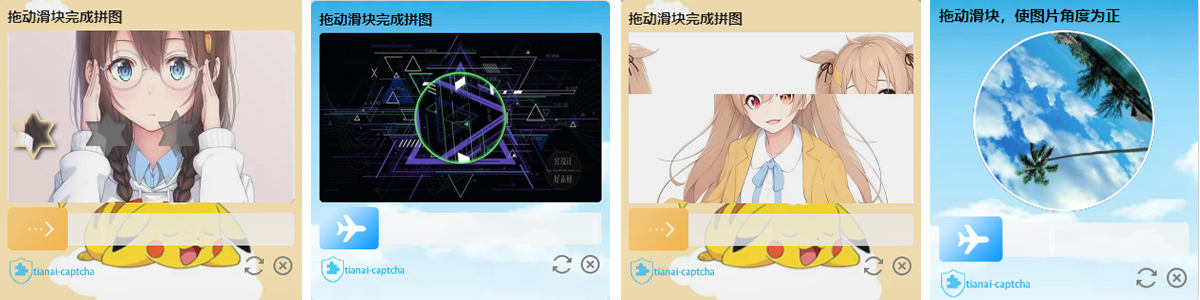
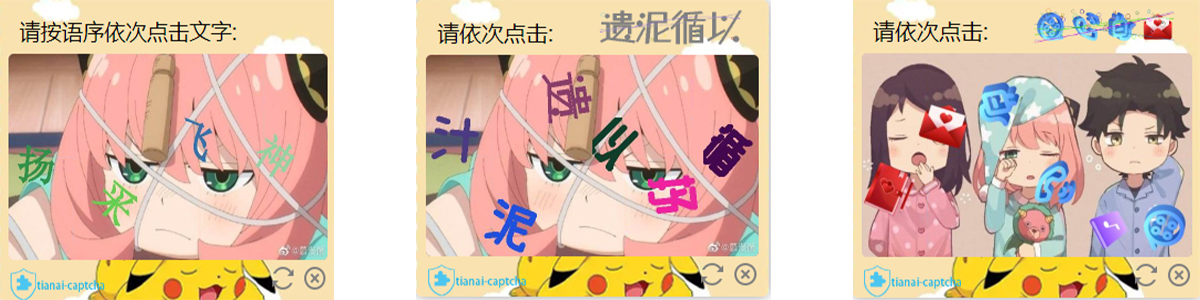
Live Demo
Documentation
Doc version: v1.5.6
Reading Guide
Suggested order:
- Quick Start — get Spring Boot + frontend SDK working
- Backend / Frontend Config — YAML, resources, styles
- Secondary verification, GenerateParam, POW — as needed
- Advanced — cache, interceptors, image transform
Runnable demo: tianai-captcha-demo
Source: tianai-captcha
Chinese docs: 中文文档
Quick Start
CAPTCHA Types
| Constant | Description | Needs background | Needs template |
|---|---|---|---|
SLIDER | Slider puzzle | Yes | Yes (gap) |
ROTATE | Rotation | Yes | Yes (outline) |
CONCAT | Concat / swipe restore | Yes | No |
WORD_IMAGE_CLICK | Word click | Yes | No (fonts optional) |
POW | Proof of Work (new in 1.5.6) | No | No |
See CaptchaTypeConstant.
Spring Boot (minimal)
1. Dependency
<dependency>
    <groupId>cloud.tianai.captcha</groupId>
    <artifactId>tianai-captcha-springboot-starter</artifactId>
    <version>1.5.6</version>
</dependency>
2. Minimal application.yaml
captcha:
  # Load built-in slider/rotate templates
  init-default-resource: true
  expire:
    default: 10000
    WORD_IMAGE_CLICK: 60000
More options: Backend Configuration.
3. Background images (recommended)
With built-in templates, backgrounds should be 600x360. POW does not need backgrounds.
@Configuration
public class CaptchaResourceConfiguration {

    @Bean
    public ResourceStore resourceStore() {
        LocalMemoryResourceStore resourceStore = new LocalMemoryResourceStore();
        // Resource: type (classpath / file / URL), path, tag
        resourceStore.addResource(CaptchaTypeConstant.SLIDER,
                new Resource("classpath", "bgimages/a.jpg", "default"));
        resourceStore.addResource(CaptchaTypeConstant.ROTATE,
                new Resource("classpath", "bgimages/48.jpg", "default"));
        resourceStore.addResource(CaptchaTypeConstant.CONCAT,
                new Resource("classpath", "bgimages/48.jpg", "default"));
        resourceStore.addResource(CaptchaTypeConstant.WORD_IMAGE_CLICK,
                new Resource("classpath", "bgimages/c.jpg", "default"));
        return resourceStore;
    }
}
4. Generate / check APIs
Same pattern as the official demo:
@RestController
public class CaptchaController {

    @Autowired
    private ImageCaptchaApplication imageCaptchaApplication;

    @RequestMapping("/gen")
    public ApiResponse<ImageCaptchaVO> genCaptcha(
            @RequestParam(value = "type", required = false) String type) {
        if (StringUtils.isBlank(type)) {
            type = CaptchaTypeConstant.SLIDER;
        }
        GenerateParam param = new GenerateParam();
        param.setType(type);
        return imageCaptchaApplication.generateCaptcha(param);
    }

    @PostMapping("/check")
    public ApiResponse<?> checkCaptcha(@RequestBody CaptchaData data) {
        ApiResponse<?> response = imageCaptchaApplication.matching(data.getId(), data.getData());
        if (response.isSuccess()) {
            // Return id for secondary verification / business binding
            return ApiResponse.ofSuccess(Collections.singletonMap("id", data.getId()));
        }
        return response;
    }

    @lombok.Data
    public static class CaptchaData {
        private String id;
        private ImageCaptchaTrack data;
    }
}
- Generate:
GET /gen?type=SLIDER(alsoROTATE/CONCAT/WORD_IMAGE_CLICK/POW) - Check:
POST /check, body{ "id": "...", "data": { ...track or POW result... } }
Tip: Prefer
matching(id, new MatchParam(track)). If secondary verification is enabled, the starter wrapper mainly hooksmatching(String, ImageCaptchaTrack)— matching the demo is safer.
Frontend (minimal)
1. Get the SDK
- Download: https://gitee.com/dromara/tianai-captcha/releases/download/tianai-captcha-1.5.6/tac-web.zip
- Or build: https://gitee.com/dromara/tianai-captcha/tree/master/tianai-captcha-web-sdk (
npm run build)
Keep frontend SDK version aligned with the backend. Put the unzipped tac folder where the browser can reach it (e.g. Spring Boot static/tac).
2. Minimal example (direct include — easiest)
<link rel="stylesheet" href="/tac/css/tac.css">
<script src="/tac/js/tac.min.js"></script>
<div id="captcha-box"></div>
<script>
  new TAC({
    requestCaptchaDataUrl: "/gen?type=SLIDER",
    validCaptchaUrl: "/check",
    bindEl: "#captcha-box",
    validSuccess: (res, c, tac) => {
      tac.destroyWindow();
      console.log("captcha id =", res.data.id);
    }
  }, {}).init();
</script>
For production, prefer on-demand load.js (lighter first paint). Full config / styles / type switching: Frontend Configuration.
Backend Configuration
Config class: cloud.tianai.captcha.spring.autoconfiguration.SpringImageCaptchaProperties (prefix = captcha).
Full YAML
captcha:
  # Cache key prefix (default: captcha)
  prefix: captcha
  # TTL in ms; built-in default ~20s if expire.default is omitted
  expire:
    default: 10000
    WORD_IMAGE_CLICK: 60000
    POW: 60000
  # Load built-in templates (default: false)
  init-default-resource: true
  # Built-in template path prefix (usually unchanged)
  # default-resource-prefix: classpath:META-INF/cut-image/template
  # Local pre-generate cache
  local-cache-enabled: true
  local-cache-size: 20
  local-cache-wait-time: 1000
  local-cache-period: 5000
  # local-cache-expire-time: 10000
  # Fonts for word-click; supports ?tag=xxx
  font-path:
    - classpath:font/SimHei.ttf
    # - classpath:font/other.ttf?tag=font1
  secondary:
    enabled: false
    expire: 120000
    keyPrefix: "captcha:secondary"
Notes:
- With Spring Data Redis, the starter prefers
RedisCacheStore/RedisResourceStore; otherwise local implementations. - POW does not depend on
init-default-resourceor background images.
Custom templates
Slider / rotate also need templates (gap / outline). With init-default-resource: true you can use official templates; custom example:
@Bean
public ResourceStore resourceStore() {
    LocalMemoryResourceStore resourceStore = new LocalMemoryResourceStore();

    ResourceMap sliderTemplate = new ResourceMap("default", 2);
    sliderTemplate.put("active.png", new Resource("classpath", "META-INF/cut-image/template/slider_1/active.png"));
    sliderTemplate.put("fixed.png", new Resource("classpath", "META-INF/cut-image/template/slider_1/fixed.png"));
    resourceStore.addTemplate(CaptchaTypeConstant.SLIDER, sliderTemplate);

    ResourceMap rotateTemplate = new ResourceMap("default", 2);
    rotateTemplate.put("active.png", new Resource("classpath", "META-INF/cut-image/template/rotate_1/active.png"));
    rotateTemplate.put("fixed.png", new Resource("classpath", "META-INF/cut-image/template/rotate_1/fixed.png"));
    resourceStore.addTemplate(CaptchaTypeConstant.ROTATE, rotateTemplate);

    resourceStore.addResource(CaptchaTypeConstant.SLIDER, new Resource("classpath", "bgimages/a.jpg", "default"));
    // Also: file / URL
    // resourceStore.addResource(CaptchaTypeConstant.SLIDER, new Resource("file", "/data/bg.jpg", "default"));
    // resourceStore.addResource(CaptchaTypeConstant.SLIDER, new Resource("URL", "https://xx/bg.jpg", "default"));
    return resourceStore;
}
- Common template keys:
active.png(piece),fixed.png(gap); optionalmask.png,obfuscate_fixed.png - Word-click, concat, and POW do not need templates
Plain Java (non-Spring Boot)
<dependency>
    <groupId>cloud.tianai.captcha</groupId>
    <artifactId>tianai-captcha</artifactId>
    <version>1.5.6</version>
</dependency>
ImageCaptchaApplication application = TACBuilder.builder()
        .addDefaultTemplate()
        .expire("default", 10000L)
        .expire(CaptchaTypeConstant.WORD_IMAGE_CLICK, 60000L)
        .expire(CaptchaTypeConstant.POW, 60000L)
        .setInterceptor(EmptyCaptchaInterceptor.INSTANCE)
        .addResource(CaptchaTypeConstant.SLIDER, new Resource("classpath", "META-INF/cut-image/resource/1.jpg"))
        .addResource(CaptchaTypeConstant.WORD_IMAGE_CLICK, new Resource("classpath", "META-INF/cut-image/resource/1.jpg"))
        .addResource(CaptchaTypeConstant.ROTATE, new Resource("classpath", "META-INF/cut-image/resource/1.jpg"))
        .addResource(CaptchaTypeConstant.CONCAT, new Resource("classpath", "META-INF/cut-image/resource/1.jpg"))
        .cached(10, 1000, 5000, 10000L)
        .addFont(new Resource("file", "/path/to/font.ttf"))
        .setCacheStore(new LocalCacheStore())
        .setTransform(new Base64ImageTransform())
        .build();

ApiResponse<ImageCaptchaVO> captcha = application.generateCaptcha(CaptchaTypeConstant.SLIDER);
ApiResponse<?> match = application.matching(captchaId, track);
ImageCaptchaApplication is thread-safe — use one global instance; do not build() repeatedly.
Frontend Configuration
Compatibility: Chrome / Firefox / Safari / Opera / major mobile browsers / iOS & Android WebView
Frameworks: H5, Vue2/3, React, Angular (vanilla JS SDK)
Use direct tac.min.js include for the quickest start.
For production, prefer load.js on-demand loading: only a tiny load.js on first paint; load tac.min.js / tac.css when the user clicks login.window.initTAC and window.loadTAC are the same method.
| Approach | When | Entry |
|---|---|---|
Direct tac.min.js | Quick start / demos | new TAC(config, style).init() |
load.js on-demand (prod) | Load assets on login/submit | window.loadTAC(tacDir, config, style) |
captchaConfig
| Option | Required | Description |
|---|---|---|
bindEl | Yes | Mount selector, e.g. #captcha-box |
requestCaptchaDataUrl | Yes | Generate API, e.g. /gen?type=SLIDER |
validCaptchaUrl | Yes | Validate API, e.g. /check |
validSuccess(res, c, tac) | Recommended | Success callback — implement your business logic |
validFail(res, c, tac) | No | Default: reloadCaptcha() |
btnRefreshFun(el, tac) | No | Default: reload |
btnCloseFun(el, tac) | No | Default: destroyWindow() |
requestHeaders | No | Custom headers (auth, etc.) |
Instance methods: init() / reloadCaptcha() / destroyWindow() / destroyCaptcha()
styleConfig
| Option | Description |
|---|---|
logoUrl | Logo URL; null hides logo; omit for default |
btnUrl | Slider button image (built-in default) |
bgUrl | Widget background image |
moveTrackMaskBgColor | Track fill, default #89d2ff |
moveTrackMaskBorderColor | Track border, default #0298f8 |
i18n | Copy & font sizes; override only what you need |
i18n keys (1.5.6)
| Key | Purpose |
|---|---|
tips_success | Success tip |
tips_error | Error tip |
slider_title / slider_title_size | Slider |
rotate_title / rotate_title_size | Rotate |
concat_title / concat_title_size | Concat |
image_click_title / image_click_title_size | Click |
pow_title / pow_title_size | POW (default: verifying...) |
Sample styles from the author:
const style = {
  btnUrl: "https://minio.tianai.cloud/public/captcha-btn/btn3.png",
  bgUrl: "https://minio.tianai.cloud/public/captcha-btn/btn3-bg.jpg",
  logoUrl: "https://minio.tianai.cloud/public/static/captcha/images/logo.png",
  moveTrackMaskBgColor: "#f7b645",
  moveTrackMaskBorderColor: "#ef9c0d"
};
Demo 1: load.js on-demand (recommended)
Good for login pages: load only load.js first; fetch CAPTCHA assets after click.
Prep:
- Unzip
tac-web.zipto e.g./tac(js/tac.min.js,css/tac.css) - Put load.js at
/js/load.js
<!DOCTYPE html>
<html lang="en">
<head>
  <meta charset="UTF-8">
  <meta name="viewport" content="width=device-width, initial-scale=1.0">
  <title>TAC load.js Demo</title>
  <script src="/js/load.js"></script>
  <style>
    .top { overflow: auto; margin-bottom: 12px; }
    .top li {
      float: left; list-style: none; width: 120px; height: 40px;
      margin-right: 5px; line-height: 40px; text-align: center;
      background: #409eff; color: #fff; cursor: pointer;
    }
    #login-btn {
      width: 160px; height: 44px; border: none; border-radius: 6px;
      background: #4BC065; color: #fff; cursor: pointer;
    }
  </style>
</head>
<body>
<ul class="top">
  <li data-type="SLIDER">Slider</li>
  <li data-type="ROTATE">Rotate</li>
  <li data-type="CONCAT">Concat</li>
  <li data-type="WORD_IMAGE_CLICK">Click</li>
  <li data-type="POW">POW</li>
</ul>
<button id="login-btn">Login (open CAPTCHA)</button>
<div id="captcha-box"></div>

<script>
  let globalTAC = null;
  let currentType = "SLIDER";

  const captchaConfig = {
    requestCaptchaDataUrl: "/gen?type=SLIDER",
    validCaptchaUrl: "/check",
    bindEl: "#captcha-box",
    validSuccess: (res, c, tac) => {
      tac.destroyWindow();
      login(res.data.id);
    },
    validFail: (res, c, tac) => {
      console.log("validate failed", res);
      tac.reloadCaptcha();
    },
    btnRefreshFun: (el, tac) => tac.reloadCaptcha(),
    btnCloseFun: (el, tac) => tac.destroyWindow()
  };

  const style = {
    logoUrl: null,
    moveTrackMaskBgColor: "#89d2ff",
    moveTrackMaskBorderColor: "#0298f8",
    i18n: {
      tips_success: "Success, took %s seconds",
      tips_error: "Failed, please try again!",
      slider_title: "Drag the slider to complete the puzzle",
      slider_title_size: "15px",
      rotate_title: "Drag the slider to complete the puzzle",
      rotate_title_size: "15px",
      concat_title: "Drag the slider to complete the puzzle",
      concat_title_size: "15px",
      image_click_title: "Please click in order:",
      image_click_title_size: "20px",
      pow_title: "Verifying...",
      pow_title_size: "15px"
    }
  };

  const TAC_DIR = "/tac";

  function login(captchaId) {
    fetch("/check2?id=" + encodeURIComponent(captchaId))
      .then(r => r.json())
      .then(ok => alert(ok ? "Login success" : "Secondary check failed"))
      .catch(err => console.error(err));
  }

  function openCaptcha(type) {
    currentType = type || currentType;
    captchaConfig.requestCaptchaDataUrl = "/gen?type=" + currentType;
    if (globalTAC) {
      globalTAC.destroyWindow();
      globalTAC = null;
    }
    window.loadTAC(TAC_DIR, captchaConfig, style)
      .then(tac => {
        globalTAC = tac;
        tac.init();
      })
      .catch(e => console.log("load failed", e));
  }

  document.getElementById("login-btn").addEventListener("click", function () {
    openCaptcha(currentType);
  });

  document.querySelectorAll(".top li").forEach(li => {
    li.addEventListener("click", function () {
      openCaptcha(this.getAttribute("data-type"));
    });
  });
</script>
</body>
</html>
loadTAC fetches:
{prefix}/js/tac.min.js{prefix}/css/tac.css
Notes:
- Prefix must point at the unzipped
tacdirectory - While loading,
bindElshows a waiting placeholder - Before switching type:
destroyWindow(), then change URL andloadTAC/initagain RANDOMmust be implemented by your/gen(official demo excludes POW from the random pool)
Demo 2: Direct tac.min.js (optional)
Same idea as tianai-captcha-demo:
<!DOCTYPE html>
<html lang="en">
<head>
  <meta charset="UTF-8">
  <meta name="viewport" content="width=device-width, initial-scale=1.0">
  <title>TAC Direct Include Demo</title>
  <link rel="stylesheet" href="/tac/css/tac.css">
  <script src="/tac/js/tac.min.js"></script>
</head>
<body>
<button id="login-btn">Login</button>
<div id="captcha-box"></div>
<script>
  const config = {
    requestCaptchaDataUrl: "/gen?type=SLIDER",
    validCaptchaUrl: "/check",
    bindEl: "#captcha-box",
    validSuccess: (res, c, tac) => {
      tac.destroyWindow();
      console.log("captcha id =", res.data.id);
    },
    validFail: (res, c, tac) => tac.reloadCaptcha()
  };
  const style = { logoUrl: null };

  document.getElementById("login-btn").onclick = function () {
    new TAC(config, style).init();
  };
</script>
</body>
</html>
Secondary Verification
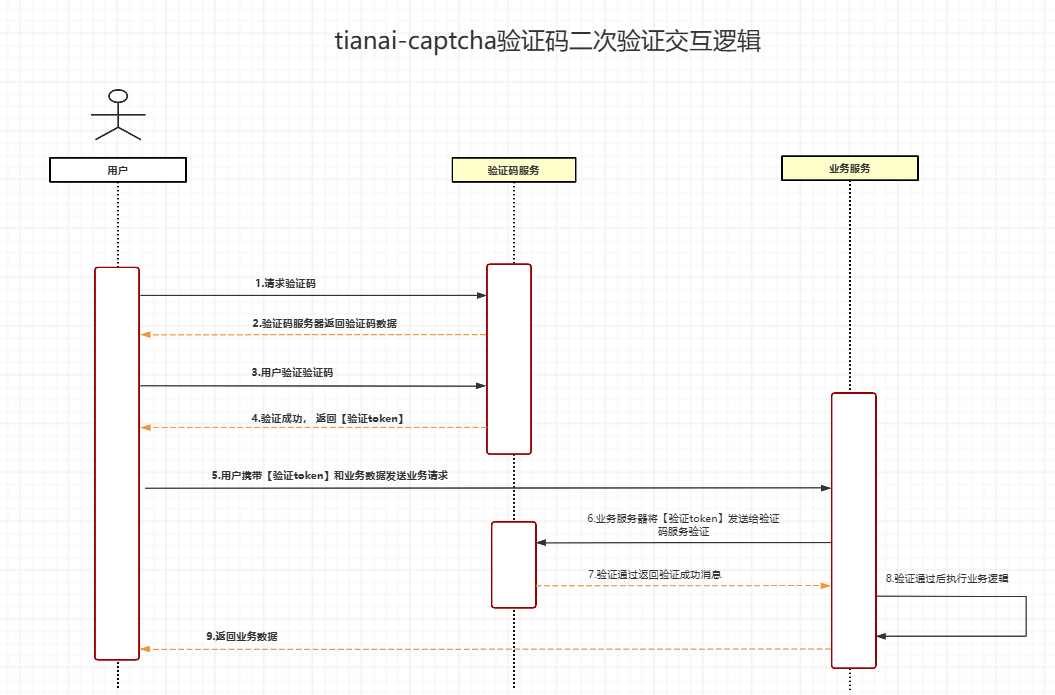
Primary check only proves the interaction passed. Business APIs usually send a token for a second check to bind CAPTCHA to login / order flows.
Enable
captcha:
  secondary:
    enabled: true
    expire: 120000
    keyPrefix: "captcha:secondary"
Business check
@GetMapping("/check2")
public boolean check2(@RequestParam("id") String id) {
    if (imageCaptchaApplication instanceof SecondaryVerificationApplication) {
        return ((SecondaryVerificationApplication) imageCaptchaApplication).secondaryVerification(id);
    }
    return false;
}
In validSuccess, take res.data.id and pass it to your business API (see demo).
Advanced GenerateParam
Obfuscation
GenerateParam param = new GenerateParam();
param.setType(CaptchaTypeConstant.SLIDER);
param.setObfuscate(true); // e.g. interference gap on slider
application.generateCaptcha(param);
No effect on POW.
Click: check count & interference count
GenerateParam param = new GenerateParam();
param.setType(CaptchaTypeConstant.WORD_IMAGE_CLICK);
param.setObfuscate(true);
param.addParam(ParamKeyEnum.CLICK_CHECK_CLICK_COUNT, 2);   // default ~4
param.addParam(ParamKeyEnum.CLICK_INTERFERENCE_COUNT, 3);  // default ~2
application.generateCaptcha(param);
Tolerant
Allows small error vs the answer. Default ~0.02. POW does not use tolerant.
param.addParam(ParamKeyEnum.TOLERANT, 0.02);
Font package
captcha:
  font-path:
    - classpath:font/123.ttf?tag=font1
Or:
resourceStore.addResource(FontCache.FONT_TYPE, new Resource("classpath", "font/123.ttf", "font1"));
param.addParam(ParamKeyEnum.FONT_TAG, "font1");
Image output format
param.setBackgroundFormatName("jpeg");
param.setTemplateFormatName("png");
Select background / template by tag
param.setBackgroundImageTag("tag1");
param.setTemplateImageTag("tag2");
Proof of Work (POW)
New in 1.5.6. CaptchaTypeConstant.POW
Server issues challenge params; browser Web Workers brute-force SHA-256 nonces; server verifies. No image, no drag/click.
Generate
application.generateCaptcha(CaptchaTypeConstant.POW);

GenerateParam param = new GenerateParam();
param.setType(CaptchaTypeConstant.POW);
param.addParam(ParamKeyEnum.POW_PARAM, Arrays.asList(4, 16, 4));
application.generateCaptcha(param);
Typical response:
{
  "id": "captcha-id (also POW token)",
  "type": "POW",
  "data": {
    "POW": [4, 16, 4]
  }
}
Frontend
With SDK 1.5.6+, /gen?type=POW is enough. Customize copy via style.i18n.pow_title.
Tuning
| Param | Meaning | Default | Note |
|---|---|---|---|
| difficulty | Target hash prefix hex length | 4 | Higher = slower client |
| saltLen | Salt length | 16 | Usually leave default |
| count | Number of challenges | 4 | More = longer total time |
Advanced Extensions
Custom CacheStore
@Bean
public CacheStore cacheStore() {
    // LocalCacheStore — local
    // RedisCacheStore — provided by the starter
    return new LocalCacheStore();
}
TACBuilder.builder()
    .setCacheStore(new LocalCacheStore())
    .build();
Do not confuse ResourceStore (assets) with CacheStore (validation cache).
Interceptors
CaptchaInterceptorGroup group = new CaptchaInterceptorGroup();
group.addInterceptor(new ParamCheckCaptchaInterceptor());
group.addInterceptor(new BasicTrackCaptchaInterceptor());
Default: EmptyCaptchaInterceptor.
Custom ImageTransform
Default Base64ImageTransform. Replace to upload to OSS and return URLs, etc.
@Bean
public ImageTransform imageTransform() {
    return new Base64ImageTransform();
}
Recommended matching API
ApiResponse<?> match = application.matching(id, new MatchParam(track));
Other Frontend Frameworks
- Vanilla JS SDK works in Vue / React / Angular
- Vue sample available via the tip widget on Chinese pages
- Apps / mini-programs can use WebView; contact the author for native SDKs
Questions or suggestions? Join the community
QQ Group: 993402836
WeChat Group:
